Mar 16, 2011

ConfigMgr 2007 Inboxes To Monitor

ConfigMgr 2007 inboxes with a backlog of files to be processed generally indicates a problem is occurring. As a result your infrastructure may suffer and may become problematic. Listed here is a list of the ConfigMgr 2007 inboxes that should be checked on a regular basis to ensure that your site(s) function as expected.

Auth\Dataldr.Box
A backlog of files can indicate problems accessing the site database.

Auth\Dataldr.Box\Process
A backlog of files can indicate problems accessing the site database.

Auth\Ddm.box\Bad_DDRs
A backlog of files can indicate a network corruption problem or a problem with the DDM

Auth\Sinv.Box
A backlog of files can indicate that the Software Inventory Processor cannot connect to the site database or that too many files were received.

Auth\Sinv.Box\Orphans
A backlog of files can indicate problems with specific clients, with management points, or with the network that could cause data corruption.

Compsumm.Box
A backlog of files can indicate that the Component Status Summarizer cannot process the volume of messages.

Dataldr.Box
A backlog of files can indicate problems accessing the Systems Management Server (SMS) database

Dataldr.Box\Badmifs
A backlog of files can indicate a bad custom MIF file or that a client computer cannot transfer the file correctly.

Ddm.Box
A backlog of files can indicate a bad DDR is preventing other DDR’s to process.

Ddm.Box\Bad_DDRs
A backlog of files can indicate a network corruption problem or a problem with the DDM

OfferSum.Box
A backlog of files can indicate a performance problem that is caused by a large number of messages.

Policypv.Box
A backlog of files in the policypv.box folder indicates that the policy provider component is not running.

Replmgr.Box\Ready
A backlog of files can indicate that the Scheduler is backlogged or is already processing files of the same priority

Schedule.Box
A backlog of files can indicate that the Sender cannot connect to or cannot transfer data to another site.

Schedule.Box\Outboxes
A backlog of .srq files indicates that the sender cannot process the number of jobs scheduled for that sender or that the sender cannot connect to or transfer data to another site.

Schedule.Box\Tosend
A backlog of files can indicate that many send requests are not completed or that the Scheduler has not yet deleted the files.

Sinv.Box
A backlog of files can indicate that the Software Inventory Processor cannot connect to the site database or that too many files were received.

Sinv.Box\BadSinv
A backlog of files can indicate problems with specific clients, with management points, or with the network, causing data corruption.

SiteStat.Box
A backlog of files can indicate a performance problem. Examine status messages for the Site System Status Summarizer for possible problems.

Statmgr.Box\Futureq
A backlog of files can indicate that some site systems' clocks are not synchronized with the site server.

Statmgr.Box\Queue
A backlog of files can indicate a problem with the Status Manager or that the component is trying to process too many messages.

Statmgr.Box\Retry
A backlog of files can indicate problems with the connection to the computer that is running SQL Server.

Statmgr.Box\Statmsgs
A backlog of files can indicate a problem with the Status Manager or that the Status Manager is trying to process too many messages

Swmproc.Box
A backlog of .sum and .sur files can indicate that the Software Metering Processor component cannot connect to the SMS database.

Additional Information:

Inbox Folders in Configuration Manager 2007
http://technet.micro...y/bb892790.aspx

Count Files In All The SMS inboxes And Send To Excel
http://myitforum.com/cs2/blogs/dhite/archi...7/23/22467.aspx

VBS Script To Count Objects In A Specified SMS Or ConfigMgr Inbox
http://myitforum.com/cs2/blogs/dhite/archi...gmgr-inbox.aspx

VBS Script To Count Objects In A Specified SMS Or ConfigMgr Inbox From A List Of Servers
http://myitforum.com/cs2/blogs/dhite/archi...of-servers.aspx

VBS Script To Count Objects In Specified SMS Site Server Inbox
http://myitforum.com/cs2/blogs/dhite/archi...rver-inbox.aspx

Mar 3, 2011

About Audit Collection Services (ACS) in Operations Manager 2007

  1. Posted in ACS Reporting, Audit Collection Services by Graham on July 9, 2009. Can't get any Windows 2008 Audit Reports with Operations Manager 2007? …
    http://systemcentersolutions.wordpress.com/category/audit-collection-services/
  2. To enable audit collection on Operations Manager 2007 agents … Concepts. About Audit Collection Services (ACS) in Operations Manager 2007 …
    http://systemscenter.ru/opsmgr2007.en/html/c3bfe528-5ba4-48fe-818e-be3d8574bfa6.htm
  3. 5 Mar 2008 … Operations Manager 2007 Command Shell. Posted Mon, Nov 17 2008. by jtalmquist … Audit Collection Services (ACS) grooming not working …
    http://blogs.technet.com/b/jonathanalmquist/archive/2008/03/05/audit-collection-services-acs-grooming-not-working.aspx
  4. Filed under: Operations Manager 2007, scom, acs, opsmgr, Events, audit … Audit Collection Services (ACS) reporting can be installed in two configurations. …
    http://myitforum.com/cs2/blogs/scug/archive/tags/audit+collection+service/default.aspx
  5. 22 May 2009 … In Operations Manager 2007, Audit Collection Services (ACS) provides a means to collect records generated by an audit policy and store them … About Audit Collection Services (ACS) in Operations Manager 2007
    http://technet.microsoft.com/en-us/library/bb381373.aspx
  6. 27 Aug 2008 … For more information, see About Audit Collection Services (ACS) in Operations Manager 2007. 2. An instance of Microsoft SQL Server 2005 …
    http://scug.be/blogs/scom/archive/2008/08/27/how-to-deploy-operations-manager-2007-acs-reporting.aspx
  7. Audit Collection Services. Information related to Audit Collection Services, part of System Center Operations Manager 2007. …. It will be possible to use SCOM 2007 and ACS as an intrusion detection system using ACS fed management …
    http://opsmgr2007.wikidot.com/system:audit-collection-services
  8. 28 Aug 2008 … On the ACS Collector, open the Services MMC snap-in, locate Operations Manager Audit Collection Service, and then stop the service. …
    http://support.microsoft.com/kb/954948
  9. Audit Collection Services (ACS). Posted: 12th July 2007 by Anders Bengtsson in System Center Operations Manager 2007 · 1. Microsoft Audit Connection Service …
    http://contoso.se/blog/?p=198

Mar 1, 2011

SCOM Alerts Severity and Priority

I don’t know why, but this information is hard to find in the docs.
Anyway, the severity and priority for alerts is mapped like this (works the same way in SCE):
Severity
  • Critical = 2
  • Warning = 1
  • Information = 0
Priority
  • High = 2
  • Medium = 1
  • Low = 0

Feb 23, 2011

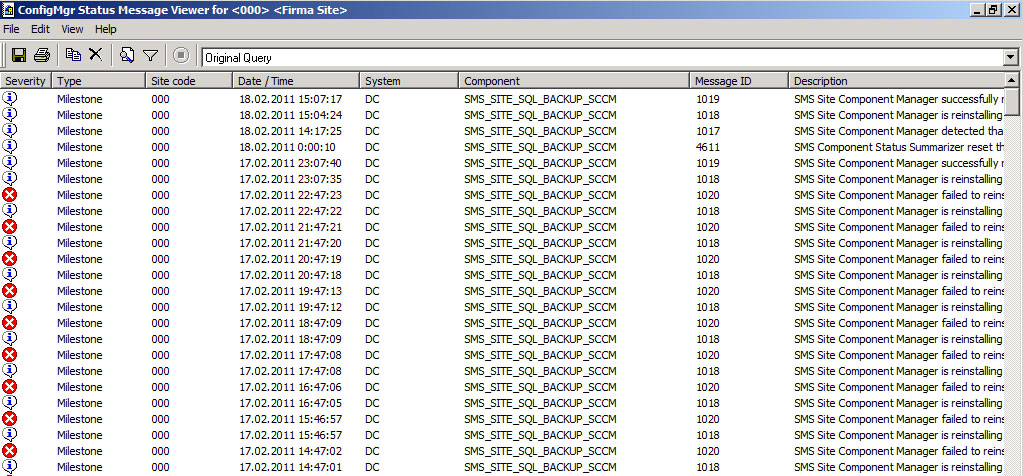
SMS Site Component Manager failed to reinstall this component on this site system

Компонент SMS_SITE_SQL_BACKUP может ежечасно сыпать ошибкой ID 1020:
SMS Site Component Manager failed to reinstall this component on this site system.
Solution: Review the previous status messages to determine the exact reason for the failure. SMS Site Component Manager will automatically retry the reinstallation in 60 minutes. To force SMS Site Component Manager to immediately retry the reinstallation, stop and restart SMS Site Component Manager using the SMS Service Manager.

Решение было найдено здесь.
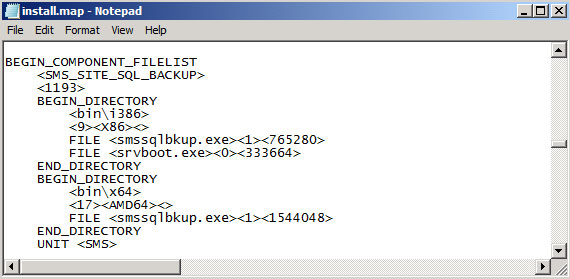
В папке с установленным SCCM 2007 (по умолчанию это C:\Program Files (x86)\Microsoft Configuration Manager\) находим файл install.map, открываем его блокнотом и ищем следующие строки:


BEGIN_COMPONENT_FILELIST
   
    <1193>
    BEGIN_DIRECTORY
       
        <9><>
        FILE <1><значение>
        END_DIRECTORY

 и меняем на
BEGIN_COMPONENT_FILELIST
   
    <1193>
    BEGIN_DIRECTORY
       
        <9><>
        FILE <1><значение>
    FILE <0><вес файла>
    END_DIRECTORY

где вес файла - объём файла srvboot.exe. Объём файла может отличаться от версии SCCM к версии. У меня SP2 R3, поэтому файл весит 333664:


Перезупаскаем службу SMS_SITE_COMPONENT_MANAGER, после чего ошибка пропадает:

Installing Opalis 6.3

Useful Resources:

Opalis Blog – http://blogs.technet.com/b/opalis/p/opalis_resources.aspx
Technet – http://technet.microsoft.com/en-gb/library/ff630946.aspx
Charles Joy – video on installing Opalis – http://blogs.technet.com/b/charlesjoy/archive/2011/01/07/installing-opalis-integration-server-6-3-video-tutorial.aspx
My Test System

Windows 2008 x64 with .Net Framework 3.5
SQL 2008 with SP1
Overview

  1. Make sure account doing the install has local windows administrator rights on the Opalis Integration Server and SQL permissions to create the Opalis database
  2. Create a domain user account and make it a local windows administrator on the Opalis server. Also, make sure it has the log on as a service right. I have found that the installer doesn’t always seem to assign this right automatically.
  3. Download the evaluation of Opalis and extract the download – you’ll find 3 folders which are also zipped. Unzip these as well.
  4. If you have 6.2.2 then you’ll need to run the SP1 upgrade. I’ll assume here that we are doing a clean install.
  5. While we are here, we should extract the licenses document – this is a word doc that contains the licenses for Opalis. We’ll need to copy and paste these into the install wizard later.
  6. Install 6.2.2.
  7. Download console files
  8. Deploy console 


Install the Opalis Integration Server

  1. Install Management Server
  2. Run Setup from the extracted 6.22_6.2.2.5229 folder
  3. Choose Install Opalis Integration Server
  4. Choose Install the Management Server
  5. Run through the Management Server wizard
  6. Accept the license
  7. Enter User Information

  8. Choose Destination Folder
  9. Enter Service Account Information
  10. Click Next to install
  11. Click Finish to complete
  12. Configure the Data Store
  13. Choose Configure the Data Store
  14. Choose SQL Server Database
  15. Type in the name of the SQL Server that will host the Opalis database
  16. Create a new database and click Finish
  17. Hopefully you’ll see this ;-)
  18. Import Licenses
  19. Choose Import a License
  20. The next stage isn’t the most intuitive. You need the license key from the Opalis Eval Product Licenses.docx (remember to include the {} brackets). And you’ll also to browse to the license file – OpalisIntegrationServer_180DAY_EVAL.lic – once this is done, you should see this. Click Close
  21. We’ll import the Integration Packs Later.
  22. Exit the installer
At this stage click EXIT – we do not want to install the client.


Run the Foundation Objects installer

  1. Extract the Opalis 6.3 folder and then browse to the Opalis Integration Server. You’ll see 3 files here.
  2. Open the Management Server installation folder on the Opalis Server. By default, this is located in System Drive: Program Files\Opalis Software\Opalis Integration Server\Management Service. Browse to the Components\Objects folder.
  3. Copy the OpalisIntegrationServer_FoundationObjects.msi file provided from the download (step 1) to the System Drive:\Program Files (x86)\Opalis Software\Opalis Integration Server\Management Service\Components\Objects directory. Replace the existing file.
  4. Run the OpalisIntegrationServer_ManagementService_630_PATCH.msp installer.
Deploy an Action Server

  1. Click Run, click Programs, click Opalis Software, click Opalis Integration Server, and then click Deployment Manager. Deploy the action servers and clients.
  2. Right click Action Servers and choose Deploy New Action Server
  3. Enter the Action Server Account details. Make sure this account has database owner rights on the Opalis database.
  4. Select any integration packs you want to deploy (we won’t have any listed as we haven’t imported them yet).
  5. Confirm the information and click Finish
  6. The installation can take a few minutes – great opportunity for a coffee break!
Deploy Client

  1. In the Deployment Manager console, right click Clients and deploy new client.
  2. State the computers onto which you want to deploy the client.
  3. State any Integration Packs you want to deploy and then click Finish.
  4. Run the client patch from:


That is core product installed. Future instalments will cover:
  • Deploying the Operator Console
  • Importing Integration Packs
  • Creating Workflows

Feb 18, 2011

Removing a retired DP from all your packages

When you remove an SMS 2003 Distribution Point (DP) from a site, and existing packages have been distributed to this DP, those packages may not be removed.  If you look at that package in the admin console you will notice that the the type has changed from "Server" to "Unknown".  The Package Status will also show a type of nothing instead of "Server".
To properly remove these you can use the Manage Distribution Points Wizard to uncheck the DP before removing it as a site system.  This can be a tedious task if you have hundreds or thousands of packages.  An alternative to doing this manually is to use the SDK.  I have attached a script that automates this task.  Note, the script does validate whether your DP still exists.  If you have already removed the DP as a site system and want to clean it up then you will have to remove the call to ValidDP().  Take note that if you do this then Distribution Manager will attempt to remove the package files from the DP so if it doesn't exist on the network then you will get errors in the distmgr.log and Distribution Manager component.


'Rslaten 03/2005

On Error Resume Next

WScript.Echo ""
WScript.Echo "SMSDPClean v1.3"
WScript.Echo "Usage: cscript.exe SMSDPClean "
WScript.Echo "Example: cscript.exe SMSDPClean.vbs myCentralSiteServer myDistributionPoint"
WScript.Echo ""

Dim SMSSiteServer, SMSNameSpace, oLocator, oServices, bDone

'Get Args, add error checking here if needed
SMSSiteServer = WScript.Arguments(0)
DP = WScript.Arguments(1)

'Get SMS namespace
SMSNameSpace = GetSMSNameSpace(SMSSiteServer)

'Connect to SMS namespace
Set oLocator = CreateObject("WbemScripting.SWbemLocator")
Set oServices = oLocator.ConnectServer(SMSSiteServer, SMSNameSpace,,,,,128)
If Err.number <> 0 Then
WScript.Echo "Error connecting to " &SMSNameSpace& " on " &SMSSiteServer& ": " &Err.Number
Set oLocator = Nothing
Set oServices = Nothing
WScript.Quit
End If

'Call main procedure
PackageLoop

'Loop until async task is done
Do While not bDone
WScript.Sleep 1000
Loop

Set oLocator = Nothing
Set oServices = Nothing
WScript.Quit


'Functions
'''''''''''''''''''''''''''''''''''''''''
'
'GetSMSNameSpace Function
'
'''''''''''''''''''''''''''''''''''''''''

Function GetSMSNameSpace(SiteServer)
On Error Resume Next
Dim
colNameSpaceQuery, refitem, refWMI
Set refWMI = GetObject("winMgmts:\\" &SiteServer&"\root\sms")
If Err.number <> 0 Then
WScript.Echo "Error connecting to SMS namespace on " &SiteServer
WScript.Quit
End If
Set
colNameSpaceQuery = refWMI.ExecQuery("select * from SMS_ProviderLocation")
For Each refitem in colNameSpaceQuery
GetSMSNameSpace = refitem.NamespacePath
Next
Set colNameSpaceQuery = Nothing
Set refitem = Nothing
Set refWMI = Nothing
End Function

'''''''''''''''''''''''''''''''''''''''''
'
'ValidDP Function
'
'''''''''''''''''''''''''''''''''''''''''

Function ValidDP(DP, SiteCode)
On Error Resume Next
Dim
SysRes, start, finish, tempDP
ValidDP = False
Set SysRes = oServices.ExecQuery("select * from sms_sci_sysresuse where SiteCode = '" &SiteCode& "'")
For each res in SysRes
start = InStr(res.NALPath,"=\\") + 3
finish = InStr(res.NALPath,"]MSWNET") - 2
tempDP = mid(res.NALPath,start,finish-start)
If (UCase(tempDP) = UCase(DP)) and (res.RoleName = "SMS Distribution Point") Then
Set SysRes = Nothing
ValidDP = True
Exit Function
End If
Next

Set SysRes = Nothing
End Function

'''''''''''''''''''''''''''''''''''''''''
'
'PackageLoop SubRoutine
'
'''''''''''''''''''''''''''''''''''''''''

Sub PackageLoop
On Error Resume Next
Dim
sinkcol, retValuecol
bDone = False
Set sinkcol = wscript.CreateObject("WbemScripting.SWbemSink","SINKCOL_")
retValuecol = oServices.ExecQueryAsync(sinkcol,"SELECT * FROM SMS_DistributionPoint")
If Err.Number <> 0 Then
WScript.Echo "Error running query:" &err.description
WScript.Quit
End If
End Sub
Sub
SINKCOL_OnObjectReady(objDP, objAsyncContext)
On Error Resume Next
Dim
start, finish, tempDP
start = InStr(objDP.ServerNALPath,"=\\") + 3
finish = InStr(objDP.ServerNALPath,"]MSWNET") - 2
tempDP = mid(objDP.ServerNALPath,start,finish-start)
If UCase(tempDP) = UCase(DP) Then
WScript.Echo "Found " &DP& " on "& objDP.SiteCode& " linked to package " &objDP.PackageID
If ValidDP(DP, objDP.SiteCode) Then
WScript.Echo "Validated " &DP& " for site " &objDP.SiteCode
objDP.Delete_()
If Err.number <> 0 Then
WScript.Echo "Failed to delete " &DP& " from package " &objDP.PackageID& " on site " &objDP.SiteCode
WScript.Echo "Error = " &Err.number& " - " &Err.Description
Else
WScript.Echo "Successfully deleted " &DP& " from package " &objDP.PackageID& " on site " &objDP.SiteCode
End If
Else

WScript.Echo DP& " is not specified as a distribution point on site " &objDP.SiteCode
End If
End If
End Sub
Sub
SINKCOL_OnCompleted(iHResult, objErrorObject, objAsyncContext)
bDone = True
End Sub

Feb 16, 2011

SMS/SCCM Command-line Actions


WMIC is a very powerful but rarely used tool to manage WMI from Command-line and it's part of the Operating-system since WindowsXP.... !

Some examples to trigger SMS/SCCM Client Actions from command line:

Disable Software-Distribution:
WMIC /namespace:\\root\ccm\policy\machine\requestedconfig path ccm_SoftwareDistributionClientConfig CREATE ComponentName="Disable SWDist",Enabled="false",LockSettings="TRUE",PolicySource="local",PolicyVersion="1.0" ,SiteSettingsKey="1" /NOINTERACTIVE

Re-Activate Software-Distribution:
WMIC /namespace:\\root\ccm\policy\machine\requestedconfig path ccm_SoftwareDistributionClientConfig WHERE ComponentName="Disable SWDist" delete /NOINTERACTIVE

Trigger Hardware Inventory:
WMIC /namespace:\\root\ccm path sms_client CALL TriggerSchedule "{00000000-0000-0000-0000-000000000001}" /NOINTERACTIVE

Trigger Software Inventory:
WMIC /namespace:\\root\ccm path sms_client CALL TriggerSchedule "{00000000-0000-0000-0000-000000000002}" /NOINTERACTIVE

Trigger DataDiscoverRecord (DDR) update:
WMIC /namespace:\\root\ccm path sms_client CALL TriggerSchedule "{00000000-0000-0000-0000-000000000003}" /NOINTERACTIVE

Force a FULL HW Inventory on next HW-Inv Schedule:
WMIC /namespace:\\root\ccm\invagt path inventoryActionStatus where InventoryActionID="{00000000-0000-0000-0000-000000000001}" DELETE /NOINTERACTIVE

Repair SMS/SCCM Agent on a remote client:
WMIC /node:%MACHINE% /namespace:\\root\ccm path sms_client CALL RepairClient

Repair a list (all clients listed in clients.txt) of remote SMS/SCCM Agents:
WMIC /node:@clients.txt /namespace:\\root\ccm path sms_client CALL RepairClient